You can view your care episodes on the Patientcentre home screen. A care episodes is usually a collection of care activities and messages for the same condition, for which you will usually require a referral from a GP to start the care episode.
The number annotations on the screen are described below.
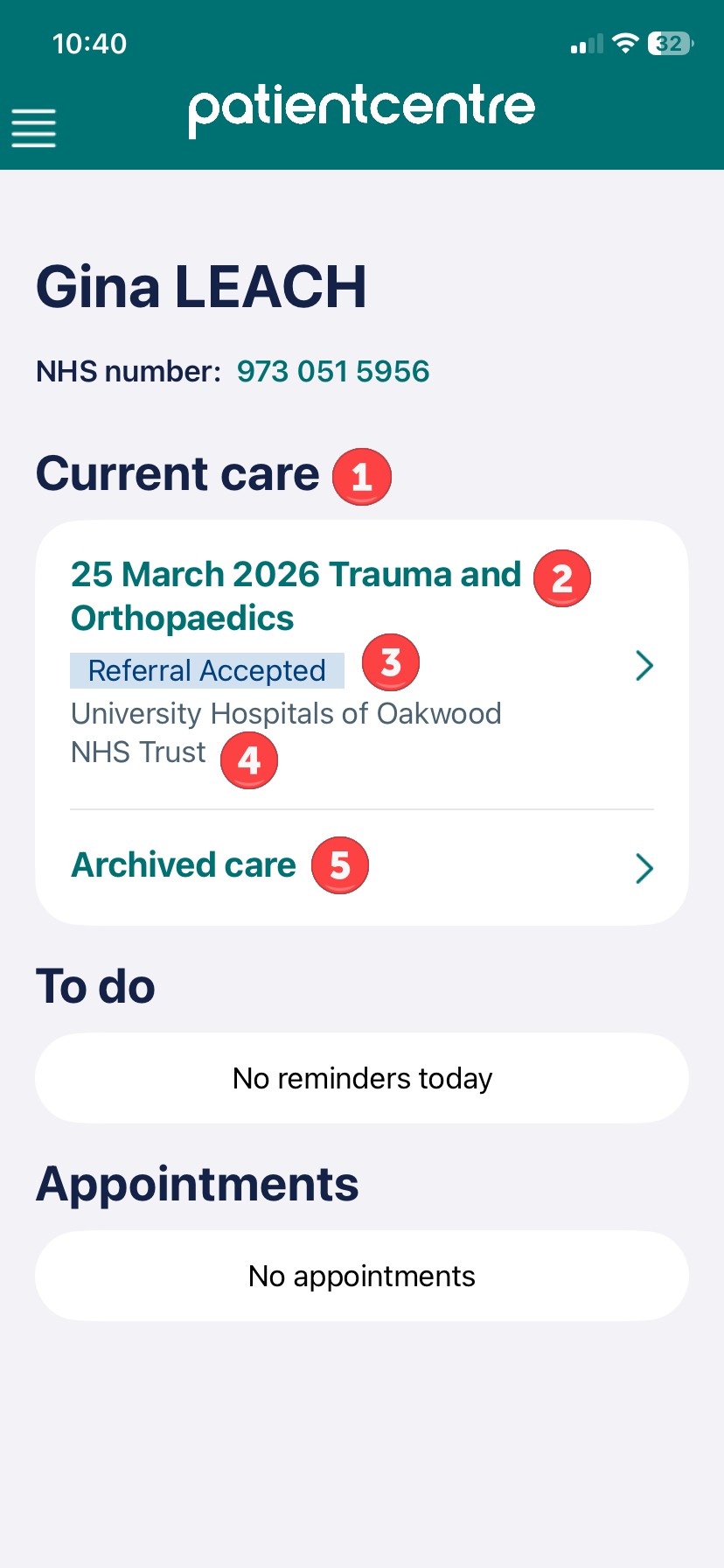
- Current care section - all your current care episodes will appear on the Patientcentre home screen below the Current Care heading. If your care for this particular condition has ended, you can archive the care episode to remove it from your home screen. If you do this, you will still be able to find your archived care episode by selecting the Archived care link (see point 5 below).
- Care episode name - each care episode has a default name which contains the care episode start date (e.g. 25 March 2025) and the specialty of the care being provided (e.g. Trauma and Orthopaedics). You can change the name of your care episode to something more meaningful to you.
- Care episode status - each care episode has a status to help you understand what is happening with your care episode. The most common status is Referral Accepted which indicates your care is progressing.
- Care organisation - each care episode is managed by a care organisation, such as an NHS trust. If you have care episodes ongoing with multiple NHS trusts who use Patientcentre to communicate with their patients, the care organisation label can help you understand which activities and messages are being managed by each care organisation.
- Archived care - if you select this link, you will be able to view any care episodes that you have archived
Was this article helpful?
That’s Great!
Thank you for your feedback
Sorry! We couldn't be helpful
Thank you for your feedback
Feedback sent
We appreciate your effort and will try to fix the article